
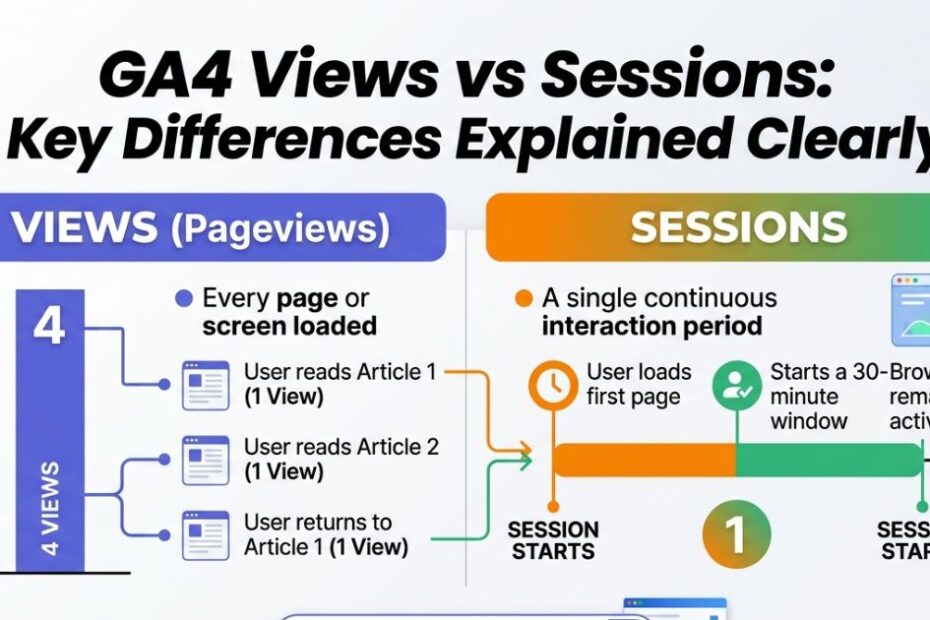
Understanding the difference between views and sessions in Google Analytics 4 is essential if you want accurate insights into your website performance. Views represent the total number of pages or screens users look at, including repeated views of the same page. On the other hand, sessions measure a group of user interactions within a specific time frame, giving you a clearer picture of visits rather than individual actions. Knowing how these two metrics work helps you avoid misinterpretation and make smarter data-driven decisions.
Breaking Down the Basics
Before we get into the fancy stuff, we need to understand the basic building blocks of your website traffic. Let us define our main terms so you feel completely confident looking at your dashboard.
What Are Views in GA4?
Think of a view as a single glance at a piece of artwork in a museum. Every time someone loads a page on your website or opens a screen on your mobile app, it counts as a view.
If your best friend visits your homepage, that is one view. If they click over to your “About Me” page, that is a second view. If they hit the refresh button because their internet is acting goofy, that counts as a third view. Views simply count how many times your content appeared on a screen.
What Are Sessions in GA4?
Now, let us zoom out a bit. A session is the entire visit to the museum. It starts the moment someone walks through the front door of your website and ends when they leave.
During one session, a single person might rack up five different views, click three buttons, and sign up for your newsletter. All of those actions happen inside one single session. If that same person leaves and comes back the next day, a brand new session begins.
How Do Views and Sessions Work Together?
Views and sessions are like peanut butter and jelly. They are great on their own, but they tell a much better story when you put them together.
If you have 100 sessions and 300 views, it means people are looking at an average of three pages every time they visit. This tells you that your visitors are curious. They are not just peeking at one page and running away. They are sticking around to see what else you have to offer.
Key Differences Between GA4 Views and Sessions
You might be wondering why we even need two different numbers. Comparing GA4 views vs sessions shows us two totally different sides of the same coin.
When you compare Universal Analytics vs GA4, you will notice things have changed. The old system tracked things a bit clunkily. The new event-based tracking system treats everything as an action. A session start is an action. A page load is an action.
The biggest difference is that a session has a specific time limit. It groups a bunch of actions together. A view is just one single, solitary action. You can have many views inside one session, but you can never have multiple sessions inside one view.
Why Do Views and Sessions Matter?
Numbers on a screen are pretty useless unless they actually teach you something. Paying attention to these metrics helps you solve real problems on your website.
Measuring Content Popularity
Views are your ultimate popularity contest. If you write five different blog posts, your views will tell you exactly which one is the crowd favorite.
Maybe your post about baking chocolate chip cookies got 5,000 views, but your post about eating broccoli only got 12. Now you know exactly what your audience wants! You can use this information to create more of the content people actually love.
Understanding User Engagement
Sessions tell you how deeply people care about your website. This is where engagement metrics really shine.
You want to look closely at your engaged sessions. An engaged session means someone stayed on your website for at least 10 seconds, looked at multiple pages, or completed a specific goal. If you have tons of total users but very few engaged sessions, it means people are showing up to your party but turning around and walking right back out the door.
Practical Applications of GA4 Metrics

Let us put this knowledge into action. Here are a few ways you can use these numbers to improve your website today.
Using Views to Optimize Your Content
Take a look at your views per session. If this number is super low, like 1.1, your visitors are only looking at one thing before they leave.
You can fix this easily! Add helpful links inside your articles pointing to other cool stuff you have written. Put a “Related Posts” section at the bottom of the page. Make it incredibly easy for your visitors to find more awesome content to read.
Leveraging Sessions to Improve Retention
Pay attention to your sessions per user. This metric tells you if people love your site enough to come back.
Are your returning users initiating new sessions? If they are, you are building a loyal fan base. If mostly new users visit once and never return, you might need to start an email newsletter to remind them how great your website is. Keeping your active users happy is the easiest way to grow.
Advanced Insights: Beyond Views and Sessions
Once you master the basics, you can start digging into the really fun stuff.
Analyzing by Traffic Sources
Where are your visitors coming from? GA4 lets you see which traffic sources bring in the most sessions.
Maybe you get 1,000 sessions from a funny video you posted on social media, but those people only stay for two seconds. Meanwhile, you get 100 sessions from people searching on Google, and they stay for ten minutes! Knowing this helps you figure out where to spend your time and energy.
Tracking Cross-Device Behavior
People are constantly switching devices. They might find your website on their phone while riding the bus, and then buy something on their laptop when they get home.
GA4 is incredibly smart. It can often figure out that this is the same person. This helps you track conversion events accurately, so you know exactly which pages are making you money.
Your Biggest Questions Answered
Let us tackle a few of the most common head-scratchers people have when looking at their data.
What’s the Best Way to Use Views and Sessions for SEO?
Search engine optimization is all about making Google happy. To do that, you need to understand GA4 views vs sessions to see what content actually keeps people on your site.
If Google sends you traffic, but your sessions are very short, Google will think your website is not helpful. By checking your views, you can figure out which pages keep people reading. You can then update your boring pages to make them just as exciting as your popular ones.
How Can You Identify High-Value Pages?
You want to find the pages that trigger key events. A key event is a super important action, like buying a shirt, downloading a game, or filling out a contact form.
Look at which specific pages get the most views right before a key event happens. Those pages are your secret weapons! Treat them like gold and make sure they are perfectly polished.
Hidden Gems You Should Know About
There are a few secret settings and tools hidden inside your dashboard that can make your life much easier.
Understanding Session Timeout Settings
By default, if someone leaves your website open on their computer and walks away to make a sandwich, their session ends after 30 minutes of doing nothing.
If your website has super long, one-hour videos, this 30-minute rule might mess up your data. The good news is that you can actually change this setting! You can tell GA4 to wait longer before ending the session, making your data much more accurate for your specific website.
Predictive Analytics
This is basically a magic crystal ball. GA4 uses incredibly smart computer brains to guess what your users will do next.
It can look at your current sessions and predict which users are most likely to buy something in the next week. You can use this superpower to show special advertisements specifically to the people who are ready to make a purchase.
Common Mistakes to Avoid
Even smart people trip up sometimes. Watch out for these easy-to-make blunders.
Misinterpreting the Data
Do not get confused when comparing GA4 views vs sessions. Remember that your view count will almost always be much higher than your session count. This is completely normal! If you have 500 views and only 200 sessions, your website is not broken. It just means your visitors are clicking around and exploring.
Also, keep an eye out for data thresholds. Sometimes, Google hides a tiny bit of data to protect people’s privacy. If your numbers look slightly off, it might just be the system keeping user identities safe.
Ignoring Session Duration
Having a million sessions sounds amazing. But if every session lasts for exactly one second, those million visits are completely worthless.
Never look at your total session count without also looking at how long those sessions lasted. You want happy, engaged visitors who actually stick around to read your brilliant writing.
Ready to Rock Your Website Stats?
You made it! You now know the core differences between a quick page load and a full website visit.
Understanding GA4 views vs sessions is the very first step toward making your website totally unstoppable. You know how to track what is popular. You know how to see if people are actually engaging with your content. You even know how to spot returning fans!
Your next step is simple. Open up your analytics dashboard right now. Find your most popular page by looking at the views. Then, check your sessions to see how long people stay. Use that information to make your website a little bit better today. You have got this!
Conclusion
In Google Analytics 4, understanding the difference between views and sessions is crucial for accurate performance tracking. Views show how often content is seen, while sessions reveal how users interact with your site over time. Relying on both metrics together gives a more complete picture helping you identify engagement patterns, improve user experience, and make smarter marketing decisions.
FAQs
What is the main difference between views and sessions in GA4?
Views count every page or screen load, including repeated visits to the same page. Sessions, however, represent a complete user visit, grouping multiple interactions within a set time frame. This means one session can include multiple views.
Can a single user generate multiple sessions?
Yes, a single user can have multiple sessions. For example, if a user visits your website, leaves, and returns after some time (or after the session timeout), GA4 counts it as a new session. This helps track how often users come back to your site.
Which metric should I focus on for better insights?
It depends on your goal. If you want to measure content popularity, focus on views. If you want to understand user behavior and engagement, sessions are more useful. Ideally, you should analyze both together for a complete understanding.