

If you’ve ever searched something on Google and noticed a box of expandable questions pop up below the top results, you’ve already seen a PAA box in action. 20001 What is a PAA box? Simply put, the PAA Box, or People Also Ask box, is a feature in Google’s search results that displays related questions users commonly ask about a specific topic. These expandable question-and-answer sections help searchers find additional information quickly without conducting multiple searches. As users click on questions, Google reveals concise answers and often generates more related questions. For businesses, bloggers, and SEO professionals, appearing in a PAA box can increase visibility, drive targeted traffic, and establish authority within search results.
What Does a PAA Box Look Like on Google?
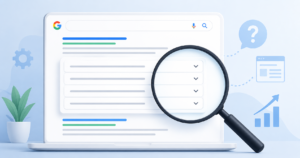
Picture a small box of questions, each one sitting on its own line with a drop-down arrow on the right. That’s the People Also Ask feature in action.
Click any question and the answer slides open underneath. Then something sneaky happens two or three new questions pop up at the bottom. Keep clicking, and the list keeps growing.
Each expanded result usually includes:
- The question as the clickable header
- A short answer snippet often 40 to 60 words
- The source link to the web page that earned the spot
- Sometimes a bonus like a list, table, or image
Where does it show up on the page? It depends. Sometimes the PAA box sits right at the top of the Google SERP (that’s the search engine results page). Other times it lands in the middle, or after a few organic results. Its position shifts based on the query and your device.
Why Do PAA Boxes Appear in Search Results?
Google has one big goal: answer your question so well that you never need another search engine. PAA boxes help it do exactly that.
Think about how you actually search. You ask one thing, get an answer, then immediately wonder something related. Google anticipates that next thought and serves it up before you even type it. Smart, right?
PAA boxes tend to appear when:
- Your query is broad or a little fuzzy Google offers options to narrow it down
- The topic has tons of related sub-questions like health, finance, or SEO
- The search intent is informational you’re looking to learn, not buy
And remember, these boxes expand almost infinitely. The more you click, the more related questions Google pulls in. It’s a rabbit hole built to keep you exploring.
How Does Google Choose What Goes Inside a PAA Box?
Google doesn’t pick randomly. It follows a rough selection process you can actually plan around.
Here’s the simplified version:
- Google maps the related questions tied to your main search.
- It scans indexed pages for clear, direct answers to each one.
- It favors well-structured content with headings that match how people ask.
- It lifts the best snippet and links back to the source page.
The pattern is clear: clarity, structure, and topical relevance win. Google wants a clean, confident answer it can drop into the box without fuss.
One honest heads-up: PAA answers rotate. The page that fills a box today might get swapped out next week. These spots aren’t permanent, so treat them as wins to defend, not trophies to forget.
Improve Your: SEO Rankings
PAA Box vs. Featured Snippet: What’s the Difference?
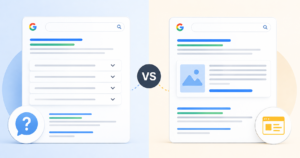
People mix these two up constantly, and it’s an easy mistake. Both pull short answers from web pages. But they behave very differently.
A featured snippet is the single, boxed answer that sits at the very top of search results often called “position zero.” A PAA box, on the other hand, is a stack of multiple expandable questions further down the page.
Here’s the clean comparison:
| Feature | PAA Box | Featured Snippet |
| Position | Mid-SERP, expandable | Top of SERP (“position zero”) |
| Trigger | Related questions | Single query answer |
| Quantity | Multiple questions | One result |
| Behavior | Expands on click | Static display |
The best part? The same skills win both. When you write tight, clear answers under question-style headings, you boost your odds for the snippet and the PAA box at the same time. One good habit, two rewards.
Why PAA Boxes Matter for Your SEO and Traffic
Let’s say you’re stuck at #6 in the organic results. Frustrating, sure. But a PAA box can lift you right up near the top of the page anyway no #1 ranking required.
That’s the magic here. You grab prime real estate without winning the toughest fight.
Here’s why PAA boxes are worth chasing:
- Extra SERP real estate your brand takes up more visible space
- Authority and trust signals being chosen by Google makes you look credible
- Multiple entry points different questions can each pull readers to your site
- Voice search and AI Overview eligibility —clear answers feed both
Quick example: imagine you run a small gardening blog. You’re ranking #6 for “how often to water tomatoes.” A competitor sits at #1. But your tight, clear answer lands inside a PAA box near the top and now you get the click.
The trade-off? Zero-click search. Sometimes Google answers so completely that people never visit your site. You gain visibility but lose the click. It’s a real downside worth weighing, and we’ll come back to it.
How to Optimize Your Content to Appear in a PAA Box

This is where strategy turns into results. Follow this workflow and you’ll stack the odds in your favor.
- Research the real PAA questions for your topic. Why it works: you target what people actually ask, not what you assume.
- Use question-based headings (H2/H3) that match the phrasing. Why it works: Google loves a heading that mirrors the search.
- Answer in 40 to 60 words, directly under the question. Why it works: that’s the sweet spot Google likes to lift.
- Add supporting structure lists, tables, steps. Why it works: organized content is easier to extract.
- Apply FAQ schema where it fits. Why it works: this code helps Google understand your Q&A format.
- Build topical depth across your site. Why it works: Google trusts pages backed by real expertise.
Notice the pattern? Ask the question, answer it fast, then prove you know your stuff. No tricks, no stuffing just clear, helpful content that respects the reader’s time.
A small tip: write like you’re explaining it to a friend over coffee. Conversational answers also do well in voice search, where people ask full questions out loud.
Common PAA Mistakes That Keep You Out of the Box
Even great writers miss these spots by tripping over small, fixable habits. Here are the big ones and how to fix each fast.
- Burying the answer → Put it directly under the question, not three paragraphs down.
- Rambling answers → Trim to a tight 40 to 60 words. Google rarely lifts a wall of text.
- Ignoring real question phrasing → Mirror how people actually ask, word for word.
- No structure → Add lists, tables, or numbered steps so Google can grab a clean chunk.
- Thin topical coverage → Build supporting articles so your site reads as an authority.
Most of these come down to one thing: respect the reader’s question and answer it head-on. Do that, and you’ve already beaten half the competition.
A Real-World PAA Workflow (From My Own Testing)

Let me share what actually happened when I tested this on a live page.
I had a blog post stuck around page two for a handful of question-style searches. It wasn’t terrible, but it wasn’t earning any PAA spots either. So I rolled up my sleeves.
Here’s the exact process I used:
- Pulled the PAA questions both by hand on Google and with a research tool.
- Rebuilt the headings so they matched those questions almost word for word.
- Added tight direct-answer paragraphs right under each heading, capped at around 50 words.
- Tracked appearances over a six-week stretch.
The honest result? Two questions started showing my page inside a PAA box within about three weeks. A third took longer and never quite landed. And one change I expected to work adding more images did basically nothing.
The lesson stuck with me: structure beats keyword stuffing every single time. Clear headings and short, useful answers moved the needle far more than cramming in extra phrases. Write for the human first, and the algorithm tends to follow.
How to Measure Your PAA Box Impact
Here’s a frustrating truth: Google doesn’t hand you a neat “PAA appearances” report. You have to read the signals like a detective.
Watch for these clues:
- Impression spikes on question-based queries a sign you’re surfacing in the box
- Click-through rate shifts sudden changes can flag new visibility
- Rank tracker PAA-feature flags some tools confirm appearances directly
This simple table keeps your tracking organized:
| Metric | Tool | What It Signals |
| Impressions | Google Search Console | PAA visibility growth |
| Featured/PAA flags | Rank tracker | Confirmed appearances |
| CTR change | GSC | Traffic effect |
A balanced reminder: don’t obsess over one metric. Google Search Console gives you the raw impression data, while a dedicated rank tracker confirms the wins. Together, they paint a fuller picture of your organic visibility.
Conclusion
Google’s People Also Ask feature has become an important part of modern search behavior. It helps users discover relevant information while creating valuable opportunities for websites to gain additional exposure. By creating clear, well-structured content that directly answers common questions, content creators can improve their chances of earning placement in PAA boxes and attracting more organic visitors.
FAQs
What does PAA stand for in SEO?
PAA stands for People Also Ask. It’s a Google search feature that shows related questions with expandable answers pulled from ranking web pages.
Are PAA boxes the same as featured snippets?
No. A featured snippet is one boxed answer at the very top of results. A PAA box is a stack of multiple expandable questions, usually further down the page.
How many questions are in aPAA box?
A PAA box usually starts with two to four questions. But as you click, fresh questions keep loading, so the list can expand almost endlessly.
Do PAA boxes help or hurt my traffic?
Both, honestly. They boost your visibility and brand authority even without a top ranking. But they can also trigger zero-click search, where Google answers fully and the user never clicks through.
How do I find PAA questions for my topic?
Search your main keyword on Google and note the questions that appear. You can also check “related searches” at the bottom of the page or use a keyword research tool for a fuller list.