
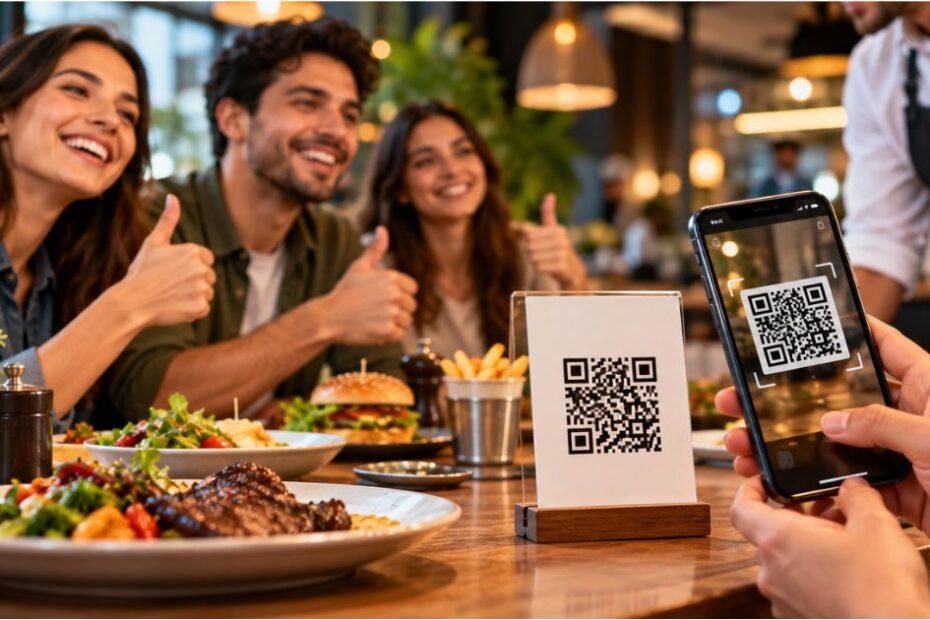
How to Get More Restaurant Reviews ? To get more restaurant reviews, ask happy guests at the moment they feel best, send them straight to your Google review link with a QR code or text, and reply to every review you receive. Do it the same way every week, follow Google and FTC rules, and never pay for or filter reviews.
Why restaurant reviews decide who gets the table
Think about how you pick a place to eat. You search, you see a few options, and you check the stars.
Your guests do the same thing. Reviews are the first impression of your restaurant, and they show up before your menu does.
The money side is real. A Harvard Business School study found that a one-star increase in a restaurant’s Yelp rating led to a 5–9% increase in revenue for independent restaurants. That study looked at Yelp, but it shows how much a rating can matter.
Guests read them. BrightLocal’s Local Consumer Review Survey, as cited by Hostme, reports that 93% of consumers read online reviews before visiting a restaurant. DoorDash’s merchant guide cites BrightLocal’s 2025 survey for the finding that 83% of consumers use Google to check out a business. [VERIFY: pull current figures from BrightLocal’s latest survey.]
Reviews also help people find you. Google’s local results often show three businesses in a map box at the top, called the local 3-pack. Reviews are one of the signals that help decide who lands there a topic we cover in more depth in our Virginia Local SEO guide, whose principles apply well beyond Virginia.
What Google actually looks at
Google doesn’t publish a recipe. Still, restaurants and marketers agree on a few review signals that matter for local visibility. These sit inside the wider set of ranking fundamentals covered in our How to Increase SEO Ranking: 2026 Framework + Checklist.
| Signal | What it means | Why it helps |
| Quantity | How many reviews you have | More proof that guests trust you |
| Star rating | Your average score | Affects clicks and trust |
| Velocity | How often new reviews arrive | Shows you’re still active |
| Recency | How fresh your latest review is | A quiet profile can look stale |
| Owner replies | Whether you respond | Shows guests you care |
| Review text | Dishes and neighborhoods guests mention | Adds natural, relevant keywords |
BrightLocal research, as reported by both Chowly and DoorDash, found that businesses in the top three map results averaged 47 more reviews than those ranked fourth through tenth. [VERIFY against BrightLocal’s original report.]
What’s proven and what’s industry folklore
Not every popular claim has solid backing. Here’s an honest scorecard.
- Well supported: Reviews influence customer choice and revenue (the Harvard Business School study).
- Widely repeated, not tied to one study: “Get 3–5 new reviews a week.” DoorDash itself says this is a widely used benchmark and isn’t tied to a single study. Treat it as a pace, not a rule.
- Claimed, but check it: “Responding to reviews is a Google ranking factor.” Several vendor blogs say Google confirmed this. Google’s own help pages stress that replying shows you value guests. [VERIFY whether Google explicitly states a ranking effect before you write it as fact.] Replying is worth doing either way.
- Often unsourced: Specific conversion rates for QR codes or scripts, and claims like “goal-setting adds 40–60% more reviews.” Skip these unless you can source them.
Honesty note: Nobody can promise a ranking or a number of reviews. What you can do is raise your odds with a consistent system.
How many reviews does a restaurant actually need?
There’s no magic number. A better question is: how many do your closest competitors have, and how fast are they adding more?
Here’s a simple way to think about it:
- Search “[your cuisine] near me” in your area.
- Write down the review count and star rating of the top three results.
- Set a goal to match or beat that count over the next several months.
Do the math on your own guests. Say 1,000 guests visit in a week. To add 3 reviews a week, you need only 0.3% of them to leave one. That’s three people out of a thousand.
The point isn’t to hit a target. It’s to show that a small, steady percentage is enough if you ask the same way every day.
Before you ask: a 5-minute profile check
Reviews land on your Google Business Profile. If that page looks neglected, guests may doubt the reviews too.
Check these five things:
- Hours are correct, including holidays
- Photos are recent and show real dishes and your dining room
- Your menu is current, with prices where possible
- Category and attributes match your restaurant (for example, “Mexican restaurant”, “outdoor seating”)
- You can sign in and respond to reviews as the owner
If you can’t log in to your profile, fix that first. You can’t reply to reviews or generate a review link without access.
How to get your Google review link and QR code (step by step)
A direct link means a guest taps once and lands on the review box. No searching, no confusion.
Steps:
- Sign in to the Google account that manages your Business Profile.
- Find your profile. Search for your restaurant’s name on Google while signed in, or open the Google Business Profile manager.
- Look for the review request option. It’s usually labeled something like “Ask for reviews” or “Get more reviews.” Google changes button names from time to time, so look for the closest match. [VERIFY current label in Google’s Business Profile Help.]
- Copy the share link (the direct review link).
- Paste the link into a free QR code generator and download the image.
- Test it on your own phone. Scan it, and make sure it opens your restaurant’s review box.
- Print it on table tents, receipts, takeout bags or the check presenter.
Pro tip: Test your QR code monthly. Printed materials get scuffed, and a dead code wastes every happy guest’s goodwill.
The Peak-Moment Ask Ladder
Most guests are happiest at specific moments: right after a great bite, after a thoughtful touch from a server, and again the next morning when they remember the meal.
The Peak-Moment Ask Ladder matches your request to those moments. Each rung is easy. Together they catch guests who’d otherwise slip away.
Rung 1: At the table (the compliment moment)
Listen for it. A guest says, “This is amazing.” That’s your cue.
Your server’s job is to thank them and make one gentle, specific ask. No script-reading. No pushing.
Who it works for: Guests who say something nice out loud.
Rung 2: At the check (the “last look” moment)
Guests are relaxed and often on their phones. A QR code on the check presenter or receipt gives them an easy next step.
Add one friendly line, like: “Loved your visit? A quick review helps other food lovers find us.”
Who it works for: Quiet guests who liked the meal but didn’t say much.
Rung 3: Within 24 hours (the memory moment)
A short text or email with your direct link catches guests while the meal is still fresh. The follow-up has to be permission-based (see the consent section below).
Hostme’s guide suggests sending the first follow-up around 24 hours after the visit and a lighter second reminder a few days later. Treat those timings as a starting point to test, not a rule.
Who it works for: Online-order guests, reservation guests and anyone who gave you their contact details.
Tip: Don’t ask every guest in the same way. Ask the ones who’ve shown they’re happy, and treat everyone else well. Then see the “gating” warning in the rules section below.
Copy-and-paste templates
Change the wording to sound like you. Guests can spot a script a mile away.
At the table (server line):
“I’m so glad you loved it. If you have 30 seconds later, a quick Google review would really help other people find us.”
On the receipt or table tent:
“Enjoyed your visit? Help a neighbor find their next favorite meal. Scan to leave a quick review.”
Text message (24 hours after, to guests who opted in):
“Hi [Name], thanks for dining with us at [Restaurant]. If you’ve got a minute, we’d love your honest feedback: [link]. Reply STOP to opt out.”
Email subject lines to test:
“How was your meal at [Restaurant]?”
“Got 30 seconds? Tell us how we did.”
Reply to a positive review:
“Thank you, [Name]! We’re thrilled you enjoyed the [dish]. We’ll tell the kitchen. Hope to see you again soon.”
Reply to a negative review:
“Thank you for telling us, [Name]. I’m sorry we missed the mark. I’d like to make it right. Please email me at [email] so I can look into what happened.”
Staff motivation (ethical version): You can reward your team for asking, such as a friendly shift-level goal. Don’t reward them based on how many positive reviews arrive, because that could push staff toward steering guests.
Is it okay to ask? What’s allowed and what isn’t

Yes, you can ask guests for reviews. But the way you ask matters.
Incentives and discounts
Don’t offer a free dessert, a discount or an entry into a prize draw in exchange for a review.
The FTC’s final rule on reviews and testimonials prohibits providing compensation or other incentives conditioned on the writing of consumer reviews expressing a particular sentiment, positive or negative. The rule also bars a business from misrepresenting that the reviews on a review portion of its website represent all or most of the reviews submitted when reviews have been suppressed based upon their ratings or negative sentiment.
Google’s own review policies also discourage incentives. [VERIFY exact wording on Google’s Business Profile review policy page.]
Safe approach: Ask. Say thank you. Don’t offer a reward.
Why “review gating” is risky
Some review software asks guests a quick question first. Happy guests get sent to Google. Unhappy guests get sent to a private form. This is called review gating (or “review routing”).
It sounds clever, but it can backfire. It may amount to selectively soliciting positive reviews, which Google’s guidelines discourage. [VERIFY Google’s current policy on selective solicitation.] It also skews what the public sees.
Safer approach: Send the same direct link to everyone you ask. If you want private feedback too, offer it as an additional option, not as a filter that decides who sees the Google link.
Texts and emails need permission
If you text or email guests, get their consent first. Marketing and promotional texts in the U.S. fall under rules like the TCPA, and email falls under CAN-SPAM. Always include a clear opt-out.
Whether a review request counts as marketing can be a gray area. Check with an attorney or your messaging provider before launching an automated campaign.
Can you ask for Yelp reviews? Where to focus
Different platforms have different rules and different audiences.
| Platform | Best for | Watch out for |
| Local search, Maps, widest reach | Follow incentive and selective-asking rules | |
| Yelp | Diners comparing options in cities | Yelp has historically discouraged businesses from asking for reviews [VERIFY current Yelp guidance] |
| TripAdvisor | Tourists and travel areas | Check their review-solicitation guidelines |
| Community and word-of-mouth | Smaller local-search impact | |
| Delivery apps | Customers who order through them | Reply in each app’s merchant portal |
Practical plan: Make Google your main task. Let guests find Yelp and TripAdvisor on their own, and keep your replies active on every platform. DoorDash’s guide recommends focusing on three platforms instead of spreading thin: Google first, Yelp second, and your delivery apps third. For the Facebook side of the equation, our Social Media Marketing for Small Business guide covers how community-driven word-of-mouth actually works.
How to reply to every review
Replying takes two minutes. It shows guests you care, and it shows the next reader how you handle problems.
For positive reviews
- Use their name.
- Mention the dish or the server they praised.
- Keep it short and warm.
For negative reviews, use this 4-step method:
- Thank them for the feedback.
- Apologize without making excuses.
- Offer to fix it or invite them to contact you directly.
- Take the details offline (give an email or phone number).
Never argue in public. The next guest is reading, not the reviewer.
For fake or abusive reviews: If a review breaks Google’s content rules (spam, a conflict of interest, an event that never happened), flag it through your profile. Removal isn’t guaranteed, so also reply politely.
Why aren’t my new reviews showing up?
It’s frustrating when a guest says they left a review and you can’t find it. Common reasons:
- Google filtered it. Automated systems sometimes hold or remove reviews that look suspicious, like several posted from one device in a short time.
- It broke a content policy. Reviews containing spam, offensive language or off-topic content can be removed.
- The reviewer’s account is new or limited. Some reviews get extra scrutiny.
- There’s a delay. New reviews can take a little while to appear.
What to do:
- Ask the guest to check that the review was posted from their own account.
- Avoid collecting reviews on a single shared tablet in the restaurant, since many reviews from one device can look unnatural.
- Don’t re-post or ask the guest to try several times in a row.
- Contact Google Business Profile support if you believe a legitimate review was removed. [VERIFY current support path.]
Dine-in, delivery or multi-location: how to adjust
| Restaurant type | Best asks | Special tip |
| Dine-in | Server compliment moment, QR on the check | Train servers to listen for praise |
| Takeout / delivery / ghost kitchen | Thank-you card in the bag, follow-up text with a direct link | CloudKitchens notes that consistent accuracy and packaging create the experiences guests want to review |
| Multi-location | A separate link and QR code for each location | Keep each location’s profile and replies local, so reviews land on the right page |
Why separate links matter: One shared link can send reviews to the wrong location, which confuses guests and weakens each profile. If you operate several branches, our guide to Local SEO for Multiple Locations covers how to keep each location’s profile, reviews and listings distinct and consistent.
A 30-seat math example
This is an illustration with made-up numbers to show how the math works. It is not a benchmark.
Imagine a 30-seat restaurant serving about 400 guests a week. You ask around 100 of the happiest guests using the Ask Ladder. If 1 in 20 of those guests leaves a review (an assumption you’d replace with your own results), that’s about 5 new reviews a week.
Now picture the same restaurant with no system. Reviews arrive only when someone feels strongly.
How to track your results

Keep it simple. Check these every week:
| Metric | How to track | What you’re looking for |
| New reviews this week | Google Business Profile | A steady trend |
| Average star rating | Google Business Profile | Stays at or above 4.0 |
| Reply rate | Count replies vs. reviews | Reply to all of them |
| Time to reply | Note the date | Within 24–48 hours |
| Which ask works best | Tag each QR code or link | Double down on what works |
You can use a different QR code for table tents and receipts, then compare which one brings in more guests. That’s real, first-party data no competitor article has. If you’re also tracking the website traffic these reviews drive, our comparison of GA4 Sessions vs GSC Clicks explains why Google Analytics and Search Console rarely report the same number.
Conclusion
Getting more restaurant reviews starts with delivering a great dining experience and making it easy for customers to share honest feedback. Train staff to ask politely at the right moment, use QR codes that link directly to your review profiles, and include review requests in receipts, follow-up messages, or table cards. Always follow each platform’s review policies by avoiding fake reviews, incentives, or pressure on customers. With a consistent and ethical approach, your restaurant can build trust, strengthen its online reputation, and help potential diners make informed decisions.
FAQs
Can restaurants ask customers for Google reviews?
Yes. Asking guests for honest feedback is allowed. Don’t offer rewards or discounts in exchange, and don’t ask only the guests you expect to leave positive reviews.
Is it illegal to offer a discount for a review?
It can be. The FTC’s final rule prohibits compensation or incentives conditioned on reviews expressing a particular sentiment, and Google’s policies also discourage incentives. Simply ask and say thanks.
How many reviews does a restaurant need?
There’s no fixed number. Compare yourself with the top local competitors and aim for a steady flow of fresh reviews instead of a single big batch.
Can I ask for Yelp reviews?
Yelp has historically discouraged businesses from soliciting reviews, so check its current guidelines before asking. Most restaurants make Google their main ask and reply actively on Yelp.
What should I do about a bad review?
Reply politely, apologize, offer to fix the problem and move the conversation offline. A calm, professional reply can build trust with future guests who read it.
How do I make a QR code for Google reviews?
Copy your direct review link from your Google Business Profile, paste it into a QR code generator, test it on your phone, and print it on table tents and receipts.
Why did my Google review disappear?
It may have been filtered or removed for breaking a content policy, or it may not have been posted. Ask the guest to check their account, and contact Google Business Profile support if you think a real review was removed.